How To Preset Cuisinart Coffee Maker Perfectly Every Time
Presetting your Cuisinart coffee maker is one of the easiest ways to wake up to a fresh cup every morning. This guide walks you through programming the timer, adjusting brew strength, and setting the right temperature for your perfect cup. You will learn simple steps, expert tips, and common mistakes to avoid so your coffee is ready when you are.
Key Takeaways
- Preset your Cuisinart coffee maker in under 5 minutes using the built-in programmable timer and auto brew feature.
- Adjust brew strength and temperature settings to match your personal taste preferences for a perfect cup every time.
- Use the 24-hour advance brew timer to have hot coffee ready when you wake up or walk into the kitchen.
- Clean and maintain your coffee maker regularly to keep preset settings accurate and your coffee tasting fresh.
- Avoid common programming mistakes like forgetting to set the clock or leaving old water in the reservoir.
- Explore advanced features like brew pause, strong brew mode, and auto shut-off for the best experience.
📑 Table of Contents
- Why You Should Preset Your Cuisinart Coffee Maker
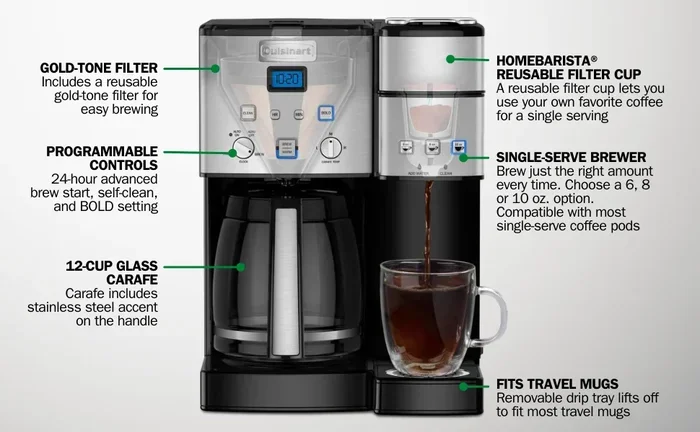
- Understanding Your Cuisinart Coffee Maker Controls
- Step-by-Step Guide to Presetting Your Cuisinart Coffee Maker
- Programming the Brew Strength and Temperature
- Tips for Maintaining Your Preset Settings
- Troubleshooting Common Preset Issues
- Making the Most of Your Morning Coffee Routine
- Conclusion
Why You Should Preset Your Cuisinart Coffee Maker
There is nothing quite like walking into the kitchen and smelling fresh coffee brewing. A preset Cuisinart coffee maker makes that possible every single morning. You do not need to be a tech expert or a morning person to make it work.
Setting up your coffee maker with a preset timer means you can enjoy a hot cup the moment you step into the kitchen. No more rushing around trying to get coffee ready while you are already running late. The Cuisinart programmable coffee maker takes the guesswork out of your morning routine.
Many people do not realize how easy it is to program their machine. Once you learn the basics, you will wonder how you ever lived without it. This guide will show you exactly how to do it right.
Whether you own a basic Cuisinart drip model or a more advanced version with multiple brew settings, the process is simple. You just need a few minutes and a willingness to learn. Let us dive in and get your coffee maker working for you.
How a Preset Coffee Maker Saves Your Morning
Think about your typical morning. You probably wake up, stumble to the kitchen, and wait several minutes for coffee to brew. With a preset machine, that waiting time disappears. You press a single button and fresh coffee is ready.
The Cuisinart auto brew feature lets you set a specific time for brewing. You can program it to start brewing 15 minutes before your alarm goes off. By the time you reach the kitchen, a full pot of hot coffee is waiting for you.
This small change can transform your entire morning. You gain extra minutes to enjoy breakfast, read the news, or simply sit quietly before the day begins. It is a luxury that feels like a necessity once you try it.
Understanding Your Cuisinart Coffee Maker Controls
Before you start programming, it helps to know what buttons and settings your machine has. Different Cuisinart models have slightly different control panels, but most share the same core features. Let us break them down so you feel confident.
The Clock and Timer Buttons
Every programmable Cuisinart coffee maker has a clock setting. This is the foundation of your preset. Without setting the correct time, your brew timer will not work properly. Look for a “Clock” or “Time” button on your control panel.
Next, you will find the “Program” or “Brew” button. This is where you set the time you want your coffee to start brewing. Most Cuisinart models allow you to set a brew time up to 24 hours in advance. That means you can have coffee ready every single day of the week.
The Brew Strength and Temperature Controls
Many Cuisinart models come with a brew strength control. This lets you choose between regular and bold coffee. Some advanced models even offer a “strong brew” option that extracts more flavor from the grounds.
Temperature settings also matter. The ideal brewing temperature for coffee is between 195 and 205 degrees Fahrenheit. Cuisinart machines with temperature control let you adjust this to get the best flavor profile for your beans.
The Brew Pause and Auto Shut-Off Features
The brew pause feature is a handy addition. It lets you pour a cup mid-brew without making a mess. The machine temporarily stops dripping when you remove the carafe from the warming plate.
Auto shut-off is another important safety feature. You can set your machine to turn off after 2 hours or 4 hours of being on. This saves energy and gives you peace of mind if you forget to turn it off.
Step-by-Step Guide to Presetting Your Cuisinart Coffee Maker
Now that you understand the controls, let us walk through the actual process. Follow these steps carefully and you will have your preset running in no time.
Step 1: Set the Clock
Press the “Clock” button and use the hour and minute arrows to set the current time. Make sure you get the AM or PM correct. This is the most important first step because all your preset times are based on the clock.
If you are unsure whether your machine is on AM or PM, check the display. Most Cuisinart models show “AM” or “PM” next to the time. Getting this wrong will mean your coffee brews at the wrong time of day.
Step 2: Add Water and Coffee Grounds
Fill the reservoir with fresh, cold water. Use the carafe markings to measure the right amount for the number of cups you want. Always use clean filtered water for the best tasting coffee.
Add your coffee grounds to the filter basket. A standard ratio is two tablespoons of grounds per six ounces of water. Adjust this to your taste preference. Freshly ground coffee always produces the best flavor.
Step 3: Program the Brew Time
Press the “Program” button. Use the time setting arrows to choose when you want the machine to start brewing. The display will show your programmed brew time. Some models also let you set different brew times for different days of the week.
Once you press “Program” again to confirm, the machine will remember your setting. You can now turn the machine off and it will automatically brew at the time you set. This is the magic of the Cuisinart preset coffee maker feature.
Step 4: Test Your Preset
Before you rely on your preset for a busy morning, do a test run. Set the brew time for a few minutes in the future and wait. Check that the machine starts brewing at the right time and that the coffee tastes as expected.
This test run helps you catch any issues early. Maybe the clock was off by a few minutes, or the water level was not quite right. Fixing these small things now saves you frustration later.
Programming the Brew Strength and Temperature
The default settings on your Cuisinart machine work well for most people. But if you are a coffee lover who wants more control, adjusting brew strength and temperature can make a big difference.
Choosing the Right Brew Strength
The brew strength control is usually a simple switch or button. On most Cuisinart models, you will find “Regular” and “Bold” settings. The bold setting uses a slightly longer brewing cycle to extract more flavor from the coffee grounds.
If you like strong, rich coffee, go with the bold setting. If you prefer a milder taste, regular is your best bet. You can also experiment with the amount of coffee grounds you use. More grounds equals stronger coffee regardless of the brew strength setting.
Adjusting the Brewing Temperature
Temperature affects coffee extraction more than most people realize. Too hot and your coffee tastes bitter. Too cool and it tastes weak and sour. The sweet spot is between 195 and 205 degrees Fahrenheit.
Some Cuisinart models let you adjust the brewing temperature. If yours does, start with the default setting and adjust from there. Keep a notebook of what temperatures produce the best results for your favorite coffee beans.
Using the Strong Brew Feature
Higher-end Cuisinart models include a strong brew feature. This activates an extended brewing cycle that pulls out more oils and flavors from the grounds. It is perfect for dark roast lovers or anyone who enjoys a robust cup.
To use this feature, simply press the strong brew button before programming your preset. The machine will automatically use the extended cycle when it starts brewing at your preset time.
Tips for Maintaining Your Preset Settings
Once you have your preset dialed in, you want to keep it working perfectly. Regular maintenance ensures your Cuisinart coffee maker continues to brew at the right time and temperature.
Clean Your Machine Regularly
Mineral buildup from hard water can affect your machine’s performance. Run a vinegar and water cycle through your coffee maker once a month. This removes calcium deposits and keeps the internal components working smoothly.
Wash the carafe, filter basket, and water reservoir with warm soapy water after each use. Fresh, clean parts mean better-tasting coffee every time. A well-maintained machine also preserves the accuracy of your preset settings.
Reset When Needed
If your preset stops working, try resetting the clock and reprogramming. Power outages and accidental button presses can sometimes clear your settings. Simply repeat the steps above and your preset will be back up and running.
If you are dealing with other kitchen appliance cleaning tasks, you might want to check out how to deep clean a Ninja Air Fryer Oven for general kitchen appliance maintenance tips. Also, for tackling tough kitchen messes, our guide on how to clean oven with burnt food offers helpful cleaning techniques that apply to maintaining a clean kitchen overall.
Replace Filters and Parts
Use a new filter every time you brew. Reusable filters should be cleaned thoroughly after each use and replaced every few months. Old filters can affect water flow and coffee quality.
Check your machine’s manual for part replacement schedules. Drip plates, water filters, and carafe lids all have a lifespan. Replacing them on time keeps your preset coffee maker running like new.
Troubleshooting Common Preset Issues
Even the best coffee makers sometimes have issues. Here are the most common problems and how to fix them.
Preset Not Working After Power Outage
This is the most common issue. When power goes out, the clock resets to 12:00. Your preset brew time is lost along with it. Simply reset the clock and reprogram your brew time. It takes less than two minutes.
Coffee Tastes Different Than Expected
If your preset coffee tastes off, check a few things first. Make sure you used fresh water and fresh coffee grounds. Clean the machine if it has not been descaled recently. Also verify that the brew strength setting has not been accidentally changed.
Sometimes the issue is as simple as the warming plate being too hot or too cool. If your coffee has been sitting on the plate for a while, it may taste burnt. Pour your coffee into a thermal carafe to keep it at the perfect temperature.
Machine Not Starting at Preset Time
If your machine does not start brewing at the programmed time, the clock might be wrong. Check that the AM or PM setting is correct. Also make sure the “Program” indicator light is on. If it is not, press the program button to reactivate it.
Some models require you to press and hold certain buttons to confirm settings. Always refer to your specific model’s manual for exact instructions. The manual is your best friend when troubleshooting.
Making the Most of Your Morning Coffee Routine
Once your Cuisinart coffee maker is preset, you can focus on enjoying your morning rather than making coffee. A few small habits can make your routine even better.
Prepare your coffee grounds and water the night before. This means less work in the morning and more time to enjoy your cup. Keep your coffee beans stored in an airtight container to maintain freshness.
Consider pairing your morning coffee with a warm breakfast. If you love freshly warmed snacks, learning how to warm tortilla chips in oven can add a delicious crunch to your morning routine. A warm, flavorful start sets the tone for the entire day.
The beauty of a preset coffee maker is that it works silently while you sleep. You wake up to the aroma of freshly brewed coffee without lifting a finger. It is a small luxury that makes a big difference in your daily life.
Experiment and Find Your Perfect Settings
Do not be afraid to experiment with different settings. Try various brew strengths, coffee-to-water ratios, and temperatures. Everyone’s taste is different, and your perfect cup might look different from someone else’s.
Keep track of what works best for you. Write down your favorite settings so you can recreate them easily. Over time, you will develop a coffee routine that feels second nature.
The goal is to make your mornings easier and your coffee better. A well-programmed Cuisinart coffee maker does exactly that. You get consistency, convenience, and a great-tasting cup every single day.
Conclusion
Presetting your Cuisinart coffee maker is one of the simplest upgrades you can make to your morning routine. It takes just a few minutes to program, and the payoff is huge. Every morning, you wake up to the smell and taste of fresh, hot coffee ready when you are.
From setting the clock to choosing your brew strength, each step is designed to be easy and intuitive. The programmable features on Cuisinart machines give you control and convenience in one package. You no longer have to rush through your morning or settle for mediocre coffee.
Remember to maintain your machine regularly. Clean it, replace the filters, and reset when needed. A well-cared-for coffee maker will serve you reliably for years. Your preset morning coffee routine will become something you look forward to every single day.
Start today. Follow the steps in this guide and enjoy the difference a perfectly preset coffee maker makes. Your mornings will never be the same.
Frequently Asked Questions
How do I set the clock on my Cuisinart coffee maker?
Press the “Clock” button and use the hour and minute arrows to set the current time. Make sure you select the correct AM or PM. The display will show your updated time once you press “Clock” again to confirm.
Can I set different brew times for different days?
Some Cuisinart models allow you to set unique brew schedules for different days of the week. Check your specific model’s manual for this feature. If your machine supports it, you can program a weekday schedule and a weekend schedule separately.
Why does my preset coffee taste different each time?
Taste variations usually come from water quality, coffee freshness, or machine cleanliness. Use fresh filtered water and new coffee grounds each time. Descale your machine monthly and replace filters regularly for consistent flavor.
How long does it take to program a preset on a Cuisinart coffee maker?
The entire process takes about 3 to 5 minutes. Setting the clock takes one minute, programming the brew time takes another, and testing your preset adds a few more minutes. It is a quick investment for a better morning every day.
What should I do if my Cuisinart coffee maker stops brewing at the preset time?
First, check that the clock is set correctly and the AM or PM indicator is accurate. Make sure the “Program” light is on. If the issue persists, try resetting the machine by unplugging it for 30 seconds and plugging it back in.
Is it safe to leave my Cuisinart coffee maker plugged in overnight?
Yes, Cuisinart coffee makers are designed to be left plugged in. The auto shut-off feature ensures the machine turns off after a set period. Still, it is a good habit to double-check that your preset is working correctly before going to bed.