Why Does My Ninja Coffee Maker Keep Beeping So Much
Your Ninja coffee maker keeps beeping for several common reasons, including a full water reservoir, a needed descale cycle, a clogged filter, or an error code alert. Understanding what each beep pattern means helps you fix the problem fast and get back to enjoying your morning cup. This guide walks you through every reason, every fix, and every quick tip to silence your machine.
There is nothing worse than standing in your kitchen, ready to start your morning, when your Ninja coffee maker starts beeping nonstop. You press a button. Nothing changes. You unplug it and plug it back in. Still beeping. It is frustrating, confusing, and enough to make you want to throw the thing out the window.
But here is the good news. Your Ninja coffee maker is not broken. It is trying to talk to you. Every beep, every flash, and every pattern means something specific. Once you understand what your machine is telling you, fixing the problem takes just a few minutes. This guide covers every single reason your Ninja coffee maker might keep beeping and gives you the exact steps to stop it.
Whether you own a Ninja Coffee Bar, a Ninja Specialty Coffee Maker, or a Ninja Espresso system, the beeping alerts work the same way. Let us break down each cause and walk you through the fix, step by step.
Key Takeaways
- Descale Reminder: The most common reason for beeping is a flashing descale light that tells you it is time to clean your machine.
- Water Reservoir Issues: An empty or improperly seated water tank triggers constant beeping alerts on your Ninja coffee maker.
- Error Codes and Sensors: Your machine uses beep patterns to communicate specific problems like overheating or sensor faults.
- Simple Fixes Work: Most beeping issues resolve with a full water tank, a proper reset, or a quick cleaning cycle.
- Preventive Maintenance: Regular descaling and cleaning stops most beeping problems before they start.
- Brand-Specific Features: Ninja coffee makers have unique alert systems that differ from other kitchen appliances like Ninja air fryer ovens.
📑 Table of Contents
- Why Your Ninja Coffee Maker Keeps Beeping
- How to Reset Your Ninja Coffee Maker
- How to Prevent Your Ninja Coffee Maker From Beeping
- Common Mistakes That Cause Beeping
- When to Call Ninja Customer Support
- Ninja Coffee Maker Beeping Patterns Explained
- How Ninja Coffee Makers Compare to Other Brands
- Final Thoughts: Silence Your Ninja Coffee Maker for Good
Why Your Ninja Coffee Maker Keeps Beeping
Kitchen appliances beep for a reason. Unlike a phone notification that you can just swipe away, your coffee maker beeps because it needs your attention. The Ninja brand designs its machines with built-in alerts that help you avoid mistakes and keep your coffee tasting great. Here are the top reasons your machine won’t stop beeping.
1. The Descale Light Is Flashing
This is the number one reason Ninja coffee makers beep. The descale light flashes when mineral buildup builds up inside your machine. Over time, calcium and lime scale collect in the heating element and water lines. This slows down brewing, changes the taste of your coffee, and can eventually damage your machine.
Ninja coffee makers use a smart sensor to estimate when descaling is needed based on how many cups you brew. When that sensor triggers, the machine beeps repeatedly to remind you. The descale cycle on a Ninja is simple and takes about 30 to 45 minutes. You just fill the reservoir with a descaling solution and water, run the cycle, and then rinse twice with clean water.
If you ignore the beeping, the machine may eventually stop brewing altogether. This is your Ninja coffee maker protecting itself. Think of it like a check engine light in your car. It is annoying, but it saves you from a much bigger problem later.
Keeping up with regular descaling also helps if you notice your coffee maker making unusual sounds, similar to how a buzzing noise from an oven signals a component that needs attention. Addressing these sounds early prevents bigger issues down the line.
2. The Water Reservoir Is Empty or Misaligned
Your Ninja coffee maker needs water to brew. When the reservoir runs low or is not seated properly, the machine beeps to warn you. This seems obvious, but it happens more often than you might think. Especially during busy mornings when you are rushing, it is easy to forget to refill the tank or to not click it into place fully.
Here is what to check:
- Is the water reservoir filled above the minimum line?
- Is the reservoir clicked firmly into its slot?
- Is the lid closing all the way?
- Are the water levels correct for the brew size you selected?
Sometimes water gets under the reservoir during cleaning and the sensor thinks it is empty. Simply remove the reservoir, dry the bottom, and reseat it firmly. The beeping should stop within seconds.
Just as a kitchen appliance left in an unusual state can trigger safety alerts, your Ninja coffee maker uses sensors to make sure everything is in the correct position before it starts brewing.
3. The Coffee Filter Basket Is Not Seated Correctly
The filter basket holds your coffee grounds during brewing. If it is not pushed in all the way, the machine detects an obstruction and starts beeping. This is a safety feature. Your Ninja wants to prevent hot water from overflowing or brewing without a filter in place.
Open the brew basket and check that it slides in smoothly with no resistance. Remove it and reinsert it firmly. You should hear a slight click when it locks into place. Also, make sure there is no leftover coffee grounds stuck inside the basket from your last brew. Old grounds can block the basket from seating properly.
This is one of those small things that causes big problems. A misaligned filter basket is one of the most common reasons people think their coffee maker is broken. But a simple reseat fixes it every time.
4. The Machine Is Overheating
Ninja coffee makers have built-in thermal protection. If the internal temperature gets too high, the machine beeps rapidly and may shut down automatically. This usually happens when:
- You run back-to-back brew cycles without a break
- The machine has been sitting in direct sunlight or near a heat source
- The ventilation vents are blocked by objects on your counter
- The internal wiring or heating element is malfunctioning
When overheating is the cause, the beeping is continuous and urgent. Unplug the machine and let it cool for at least 15 to 20 minutes. Move it away from the wall or any heat source. Once it cools down, plug it back in and try again. If the beeping continues after cooling, there may be a deeper electrical issue that needs professional attention.
Think of it this way. Your Ninja coffee maker is like any hardworking machine. It needs room to breathe and time to rest between heavy tasks. Just as an oven that produces smoke signals it is working too hard or has a buildup issue, an overheating coffee maker tells you something is wrong.
5. Error Codes and Sensor Faults
Newer Ninja coffee maker models display error codes on a small LED screen alongside the beeping. These codes tell you exactly what is wrong. Common error codes include:
- E1: Heating element malfunction
- E2: Water flow sensor error
- E3: Overheating protection triggered
- E4: Reservoir sensor fault
- E5: Brew basket not detected
When you see an error code paired with beeping, the machine is telling you a specific part has failed or is not reading correctly. Some of these you can fix yourself. Others require a replacement part or a call to customer service.
For E1 and E3 errors, unplugging the machine for 10 minutes often resets the sensor. For E2 and E4 errors, check the water lines and reservoir connections. For E5 errors, remove and reinsert the brew basket. If none of these work, contact Ninja support. Most machines come with a warranty, and the company is known for responsive customer service.
6. The Brew Size Button Was Accidentally Pressed
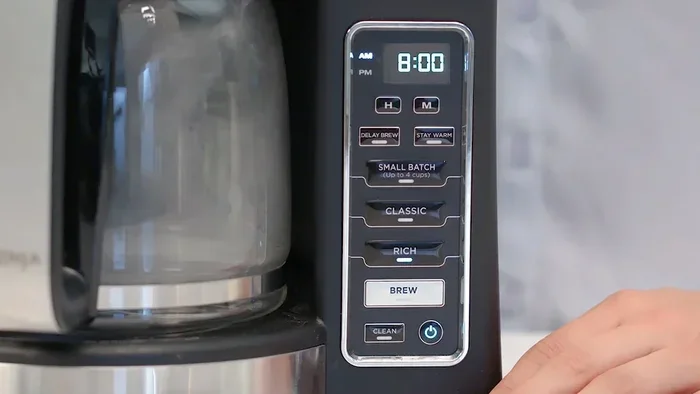
This one catches people off guard. The Ninja Coffee Bar has programmable buttons that let you set custom brew sizes. If you or someone else in your household accidentally presses one of these buttons, the machine starts beeping to confirm the selection. It is not an error. It is just waiting for you to confirm or change the setting.
To fix this, simply press the brew button you want or select a different size. The beeping stops once the machine registers your choice. If your Ninja has a programmable feature, you can also hold down the button for three seconds to reset it to default settings.
How to Reset Your Ninja Coffee Maker
When nothing else works, a reset often solves the beeping problem. Resetting your Ninja coffee maker clears error codes, resets sensors, and gives the machine a fresh start. Here is how to do it for most Ninja models.
First, unplug the machine from the wall outlet. Wait at least 60 seconds. This gives the internal circuits time to fully discharge. During this time, you can also check the water reservoir, clean the filter basket, and wipe down the exterior.
After 60 seconds, plug the machine back in. Press and hold the power button for 5 seconds. The display or indicator lights should flash once, confirming the reset was successful. Your Ninja coffee maker should now beep-free and ready to brew.
If the beeping returns immediately after a reset, the issue is likely a hardware problem rather than a software glitch. In that case, check your warranty status and contact Ninja customer support. Do not try to open the machine yourself, as this can void your warranty and create safety risks.
How to Prevent Your Ninja Coffee Maker From Beeping
Prevention is always better than fixing. Regular maintenance keeps your Ninja coffee maker running smoothly and eliminates most beeping issues before they start. Here is a simple routine you can follow every week.
- Check the water reservoir before your first brew each morning. Top it off if it is low.
- Clean the filter basket after every use. Rinse it with warm water and dry it completely.
- Run a rinse cycle once a week with just clean water and no coffee grounds.
- Descale your machine every 2 to 3 months, or more often if you live in an area with hard water.
- Wipe the exterior and vents with a damp cloth to prevent dust buildup.
- Leave the lid open after brewing to let the inside air dry and prevent mold or mildew.
- Use filtered water when possible. It reduces mineral buildup and improves coffee taste.
Following this routine takes less than 10 minutes a week. But it saves you hours of frustration and extends the life of your machine significantly. A well-maintained Ninja coffee maker can last 5 years or more with consistent care.
Keeping your coffee equipment clean is just as important as maintaining other kitchen gear. Much like learning how to deep clean a Ninja air fryer oven, regular maintenance of your coffee maker ensures peak performance and fewer annoying alerts.
Common Mistakes That Cause Beeping
Even the most experienced coffee lovers make mistakes with their Ninja machines. Here are the most common errors that lead to unnecessary beeping.
- Using the wrong water level: Too little water triggers the low-water sensor. Too much water can cause overflow alerts. Always stay between the minimum and maximum lines on the reservoir.
- Skipping the rinse cycle: Coffee oils build up inside the machine over time. These oils trigger sensors and cause off-flavors. A weekly rinse prevents this buildup.
- Using coarse grounds in a pod system: If you use a reusable pod, the grind size matters. Too coarse and water passes through too fast. Too fine and it clogs. Both scenarios cause beeping.
- Ignoring the descale reminder: Putting off descaling does not make it go away. The beeping gets louder and more frequent until you address it.
- Placing the machine too close to the wall: Poor ventilation causes overheating. Leave at least 4 inches of space on all sides of the machine.
- Using a damaged reservoir: Cracks or warping in the water tank prevent proper seating. Replace the reservoir if you see any physical damage.
When to Call Ninja Customer Support
Most beeping issues are fixable at home with simple steps. But sometimes the problem goes beyond a quick fix. Here is when you should stop troubleshooting and call for help.
Call Ninja support if:
- The beeping continues after a full reset and all basic checks
- You see an error code that does not match any of the common codes listed above
- The machine leaks water from the bottom or sides
- The coffee tastes burnt or metallic even after cleaning
- The machine makes grinding or grinding-like noises during brewing
- Your machine is still under warranty and you want a replacement or repair
Ninja has a dedicated support team that can walk you through advanced troubleshooting over the phone or chat. They can also arrange a warranty repair or replacement if your machine is defective. Keep your purchase receipt and model number handy when you call. This speeds up the process significantly.
If your machine is out of warranty, a licensed repair technician can still help. Replacement parts like heating elements, sensors, and water pumps are widely available and affordable. In many cases, a repair costs less than buying a new machine.
Ninja Coffee Maker Beeping Patterns Explained
Not all beeps are the same. Your Ninja coffee maker uses different beep patterns to communicate different messages. Understanding these patterns helps you diagnose the problem faster.
| Beep Pattern | Meaning | Solution |
|---|---|---|
| 3 short beeps, then pause | Descale reminder | Run descaling cycle |
| Continuous rapid beeping | Error code or sensor fault | Check error code on display, reset machine |
| Single beep when pressing a button | Button registered successfully | No action needed |
| 5 beeps in a row | Water reservoir empty or misaligned | Refill reservoir and reseat it |
| Beeping with flashing light | Brew basket not detected | Remove and reinsert brew basket |
| Long beep followed by silence | Machine overheating | Unplug and let cool for 15-20 minutes |
This table covers the most common beep patterns across Ninja coffee maker models. Your specific model may have slight variations, but the general meanings remain the same. If you are unsure, check your user manual or visit the Ninja support website for your exact model number.
Just like how a popping noise from an oven can mean different things depending on the context, the meaning of a beep depends on the pattern, timing, and what else is happening with the machine. Context matters when diagnosing appliance issues.
How Ninja Coffee Makers Compare to Other Brands
Ninja coffee makers are known for their versatility and smart features. But how do their alert systems compare to other popular brands?
Keurig machines also use beeping alerts for water reservoir issues and descaling reminders. However, Keurig machines tend to have simpler alert systems with fewer error codes. Breville espresso machines offer more advanced digital displays with detailed error messages. Cuisinart coffee makers use similar beep patterns to Ninja but often require more frequent descaling due to their single-tank design.
Ninja stands out because of its multi-functionality. Many Ninja models brew regular coffee, specialty drinks, espresso, and cold brew. Each function has its own set of alerts, which means the machine communicates more information to you. This is a feature, not a bug. The more alerts your machine gives you, the more it is trying to protect itself and give you the best possible coffee.
Understanding your specific machine is key. If you are coming from a simpler coffee maker, the Ninja alert system might feel overwhelming at first. But once you learn what each beep means, it becomes second nature. The alerts are there to help you, not to annoy you.
Final Thoughts: Silence Your Ninja Coffee Maker for Good
A beeping Ninja coffee maker is not the end of the world. It is a signal. And signals are meant to be acted on. Whether your machine is telling you it needs descaling, that the water reservoir is low, or that a filter basket is misaligned, the fix is almost always simple and quick.
Start with the basics. Check the water level. Reseat the reservoir and the brew basket. Run a descaling cycle if the light is flashing. If those steps do not work, try a full reset. And if nothing works, reach out to Ninja support. They are there to help.
The best way to keep your Ninja coffee maker quiet is through regular maintenance. A little care goes a long way. Descale every few months, clean the filter basket after each use, and give your machine the space it needs to breathe. Follow these habits and you will enjoy silent, reliable brewing for years to come.
Your morning coffee deserves a machine that works without making a fuss. Now you know exactly what to do when your Ninja coffee maker keeps beeping. Go enjoy that cup of coffee in peace.
Frequently Asked Questions
Why does my Ninja coffee maker beep 3 times?
Three short beeps followed by a pause is the descale reminder on most Ninja models. This means mineral buildup has reached a level that needs cleaning. Run a descaling cycle with a Ninja-approved descaling solution and fresh water. After the cycle completes, rinse the machine twice with clean water. The beeping should stop once the descale light resets.
How do I stop my Ninja coffee maker from beeping after descaling?
If the beeping continues after descaling, run two full rinse cycles with clean water and no descaling solution. Make sure the water reservoir is filled to the correct level and that the reservoir is clicked firmly into place. If the beeping still does not stop, unplug the machine for 60 seconds and plug it back in. This resets the sensors and clears any remaining alerts.
Can a low water level cause my Ninja coffee maker to beep?
Yes, absolutely. The Ninja coffee maker has a water-level sensor that detects when the reservoir is too low or not seated properly. When this sensor triggers, the machine beeps to prevent brewing without enough water. Simply refill the reservoir to above the minimum line and make sure it clicks into place. The beeping will stop immediately.
Is it normal for my Ninja coffee maker to beep when I first turn it on?
Some Ninja models emit a single short beep when powered on as a startup confirmation. This is normal and not a cause for concern. However, if your machine beeps continuously after turning on, it is signaling a problem. Check the water level, brew basket, and error codes on the display. A continuous startup beep usually means a sensor has detected an issue that needs your attention.
What should I do if my Ninja coffee maker beeps and will not brew?
First, check the water reservoir and make sure it is filled and seated correctly. Next, verify that the brew basket is properly inserted. If both are fine, check for any error codes on the display. Unplug the machine for 60 seconds and try again. If the beeping and brewing refusal continue, the machine likely has a hardware fault that requires professional service or a warranty claim.
How often should I descale my Ninja coffee maker to prevent beeping?
Ninja recommends descaling every 2 to 3 months for regular use. If you live in an area with hard water, you may need to descale every 4 to 6 weeks. Using filtered water can extend the time between descaling cycles. Staying on top of this maintenance routine prevents the descale alert from triggering and keeps your coffee tasting fresh and clean every morning.
=== CONCLUSION ===
Your Ninja coffee maker keeps beeping for a reason, and now you know exactly what that reason is. From descale reminders and water reservoir alerts to error codes and overheating warnings, each beep pattern tells a story. The good news is that most of these issues have simple, fast fixes that anyone can do at home.
Regular maintenance is your best defense against annoying beeping. Descale on schedule, clean after every use, and give your machine the care it deserves. When you do, your Ninja coffee maker will reward you with quiet, reliable brewing every single morning.
Do not let a beeping coffee maker ruin your day. Use the tips in this guide, fix the problem quickly, and get back to what really matters: enjoying a great cup of coffee.